So your keypad stopped working. Maybe certain buttons just don't register anymore. Maybe it's totally dead. Maybe you replaced the battery twice and it still does nothing.
Whatever happened - you need a new one. And you're wondering if this is something you can handle yourself or if you need to call someone.
Short version: usually yes, you can do it yourself. But there's one thing that trips almost everybody up before they even get started. We'll get to that.
First - What Does a Replacement Keypad Actually Cost?
Not much, honestly. This is one of the cheapest garage door fixes out there.
A basic brand-name keypad - LiftMaster, Genie, Chamberlain - runs somewhere between $25 and $55 at most hardware stores. Lowe's typically stocks them for $28 to $49, and the ones right around $40-45 are usually solid. Universal keypads that work across multiple brands land in the same range, maybe slightly more.
If you want a smart keypad with Wi-Fi, app notifications, and a built-in camera - think Chamberlain's myQ Video model - budget $70 to $100. More on whether that's actually worth it later.
|
What You're Buying |
Rough Cost |
|
Basic brand-name keypad |
$25 – $55 |
|
Universal keypad |
$30 – $60 |
|
Smart / Wi-Fi keypad |
$65 – $100+ |
|
Pro installation (labor only) |
$50 – $120 |
If you hire someone to install it, labor is usually $50–$120 depending on your area. Worth noting - if a technician is already at your house for something else, like a spring or the opener itself, they'll often add a keypad install for much less than a dedicated trip. So timing matters.
The Part That Actually Trips People Up: Compatibility
Here's where most homeowners go wrong. They buy a keypad, get home, try to program it, and nothing works.
The problem is that LiftMaster, Chamberlain, Genie, and Craftsman all use different communication protocols. A keypad that "works with garage door openers" on the packaging doesn't necessarily mean your opener. It's annoying, and the product listings don't always make it obvious.
Before you buy anything, find the learn button on your opener. It's a small button - usually on the back or side of the motor unit hanging from your ceiling. The color of that button tells you exactly what protocol your system uses.
LiftMaster and Chamberlain openers have green, red, orange, purple, or yellow learn buttons - each one is a different frequency. Genie uses its own Intellicode system. Craftsman openers made after 1993 are generally fine with Chamberlain/LiftMaster keypads.
If you don't want to think about any of this, grab a Chamberlain KLIK2U-P2 or a Genie GUK-R. Both are genuinely universal and work with nearly everything made since the early 90s - Chamberlain, LiftMaster, Genie, Craftsman, Overhead Door, Linear, Wayne Dalton, Stanley. Either one.
One thing to check if your opener is brand new in 2026: LiftMaster recently rolled out Security+ 3.0 with a white learn button, and most existing universal keypads don't support it yet. So if you just upgraded your opener, double-check before grabbing a universal unit off the shelf.
DIY or Call Someone?
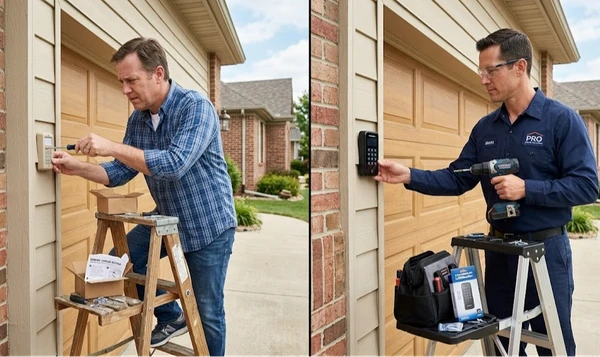
I'll be straight with you - replacing a garage door keypad is genuinely one of the few things in the garage world that's not scary to do yourself. Unlike springs or cables, there's nothing here that can hurt you. It's a plastic box on a wall and a button-press sequence.
The whole process on a modern wireless keypad:
- Mount it outside (two screws, maybe three)
- Go inside and press the learn button on your opener
- Come back out, enter your PIN, press the button again
- Test it
That's it. Most people do it in under ten minutes. The instruction sheet walks you through the exact sequence for your brand.
That said, call a pro if:
You've already tried twice and it won't program. Some older openers with rolling code issues get weird, and chasing blinking lights isn't worth your Saturday.
You have a wired keypad - less common these days, but older homes sometimes have them. If there's actual wire running through the wall, that's a different job.
You're not sure what opener you have and don't want to deal with the compatibility research.
Or you're already calling for something else - just bundle it.
Otherwise? Do it yourself and save the $50–$120.
Smart Keypads: Actually Worth It or Overkill?
Depends entirely on your situation.
A $40 basic keypad does one thing: opens the door when you type your PIN. Does it perfectly well for years. If that's all you need, don't spend more.
A smart keypad like the Chamberlain myQ Video model adds a wide-angle camera, smartphone notifications every time someone uses the garage, customizable temporary PINs for guests or contractors, and activity history. Around $80–$100.
That's genuinely useful if you have teenagers coming and going, a housekeeper with garage access, a vacation rental, or just a personality that likes knowing what's happening. Not overkill in those cases at all.
For most single-family homes where it's just you and your household? The basic model is fine.
Why Did Yours Die, and How Long Will the New One Last?
Good keypads last 5 to 10 years. The things that kill them are pretty predictable.
Dead battery left in too long. A 9V battery that drains completely and sits in a hot keypad will eventually leak. That acid corrodes the battery contacts and damages the board. Swap batteries once a year - even if it seems fine - and you avoid this entirely.
The wrong numbers wearing out. The rubber membrane under the buttons breaks down over time. People tend to punch the same numbers (usually whatever they use for their PIN), so those wear faster. When certain keys stop working and others are fine, the membrane is done. No fixing it at that point.
Moisture. They live outside. The flip-up cover helps but doesn't last forever. Water gets in, especially in climates with real winters or heavy rain. Intermittent failures that come and go usually mean moisture is involved - and it gets worse from there.
If yours is 7+ years old and acting up, just replace it. At $35–$50, troubleshooting an old unit makes no financial sense.
A Few Things Worth Knowing Before You Buy
"Universal" doesn't always mean all-brand. Read the fine print. Some universal keypads still exclude older dip-switch systems or specific model lines. Confirm your opener model is on the compatibility list before clicking buy.
OEM beats generic when the price is similar. If you have a LiftMaster opener, the genuine LiftMaster keypad will pair cleaner and more reliably than a third-party replacement. Check the price - they're often nearly identical.
Find a programming video before you start. YouTube has walkthroughs for every major brand. The printed instruction sheet that comes in the box is usually confusing. The three-minute video of someone doing it with your exact model is not.
Check your mounting situation. Older keypads sometimes used screw placements that newer ones don't match. You might need to fill a hole or use different anchors. Takes two minutes, but better to know before you're standing outside in the cold.
Have questions about which keypad fits your opener - or just want someone else to handle it?DoorFixy does keypad installs along with all garage door service. Give us a call and we'll sort it out, usually same day.